OAuth 2.0 in VS 2012

Introduction to OAuth 2.0

Like OpenID, OAuth is a decentralized protocol for the web space. However, while OpenID is about user authentication, OAuth is about web APIs authorization. To best understand OAuth, consider this scenario:
You have a web application that needs to access the Facebook timeline of its users. The application needs to call Facebook Web API to retrieve user timeline information. OAuth covers this scenario. The application redirects the user to Facebook where he/she is asked to log in; the mechanism by which a user logs in is irrelevant of OAuth (it could have been OpenID if Facebook supports it). Upon successful authentication, Facebook sends to the application an API key which the application then uses to authorize its access to Facebook’s API.

Continue reading

OpenID 2.0 with VS 2012

Introduction

Protocols WS-Trust, WF-Federation, and SAML are mainly used for connecting federated businesses in a secure manner. To be implemented, these protocols mandates certain infrastructure in order to operate: public key inftrastrucutre (PKI), security policies, and predefined security boundaries and setup are examples.
In the web space such constraints can be limiting as the main promise of the web is flexibility and loose coupling between clients (users) and the services they use (for example social media services such as facebook or twitter).
The most popular protocols in the web space are OpenId and OAuth. OpenId is the topic of this article, OAuth in the next.

Continue reading

Creating a SOAP/REST – based WCF Service with Custom Binding/Behaviors

Introduction
Ok, basically the title says it all. This post shows a WCF service with a method exposed both as a SOAP-based and REST-based endpoint. For the SOAP-based endpoint I found that there is no binding that satisfy my needs (yep, I am picky!) so I will create a custom binding – explaining what are custom bindings and what is the Channel layer in general.
Also In order to enable logging operations, I will create two custom behaviors – again explaining what are custom behaviors and what is the ServiceModel layer in general.

Continue reading

Parallel Task with ASP.NET HttpContext

When using .NET 4.0 Parallel Programming (Check my article) with ASP.NET, you will lose HttpContext once you jump in to another task.
In my case I wanted to get hold of the context from which I wanted to get the current page handler. So I came up with the below code.HOWEVER, and as you can see this is BIG HOWEVER, although I tried the code and it did work I am not 100% sure about it because the idea of manually setting the context (as you will see in a moment) and messing up with the way threading works gives me the creeps! But anyway I thought I would share it: Continue reading

Azure Storage Emulator: Process cannot access the file because it is being used by another process

If you are trying to run the services of the azure storage emulator (Blob, Queue, Table) and you ever get this error:
The process cannot access the file because it is being used by another process

Then continue reading…
As you might imagine it happened to me, and I found that the blob service is the one complaining:

I knew something was wrong with the endpoint, from the error message i could tell that most probably the problem was that the endpoint address being used by some other process.
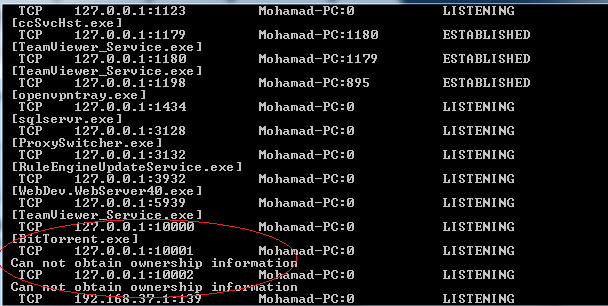
So from the command prompt i ran Network Statistics tool (Netstat) and got the following:

As you can see, i had ports 10001 and 10002 saying “cannot obtain ownership information” but anyway I had no problems with these ports as they are associated with the Queue and Table services respectively and both are started. However, it is clear that port 10000 is occupied by BitTorrent on my machine (yes you caught me!) so that is why the Blob service could not be started.
Once I stopped BitTorrent I could start the Blob service.

Note: you would have another option which would be changing the ports the emulator use for the storage services. You could do that by navigating to:
C:\Program Files\Windows Azure SDK\v1.4\bin\devstore
(replace 1.4 with your SDK version) and openning DSService.exe.config. From there you could change the configuration and make your services listen to another ports.


SharePoint 2010: Passing data from Workflow to Task Form

Implementing a state machine workflow project on a SharePoint 2010 Document Library (i will do a full post soon), I faced a situation where I wanted to pass data from the workflow instance to the ASP.NET task edit form.

Before I have many times done the reverse: passing data from the Task Edit forms to the workflow instance by defining custom content types and referencing their fields inside my workflow using the ExtendedProperties Hashtable.
Continue reading

WCF MSMQ Transactions Explained – Part1

Introduction

Before starting, I advise you to read my detailed article about .NET transactions and WCF implementation for more in depth knowledge about how transactions work. However, you can still go through this post directly to get the required knowledge about WCF MSMQ transactions.
When working with MSMQ and WCF, you have two options for bindings: NetMsmqBinding and MsmqIntegrationBinding. Continue reading